


Solitaire: Classic Card Games
4.541.87K Reviews
App Specs
- Version
- 2.1.386.2
- Updated On
- License
- Free
- Downloads
- 10,000,000+
- Developer
- PLAYSTUDIOS US, LLC
- Categories
- Card
- Platform
- Android
Screenshots
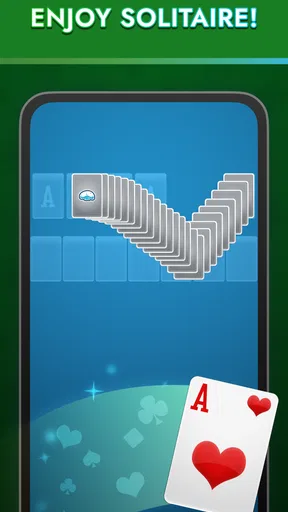
 Analysis by AppCompare
I still think the appeal of Solitaire: Classic Card Games is its familiar, low-pressure pace. It gives me a place to focus on one small puzzle without asking me to learn a complicated system first. That makes it easy to pick up for a few minutes, though the familiar format also means it won’t satisfy someone looking for a card game built around a story, opponents, or a major strategic twist.
A useful fit for short breaks
In an everyday routine, this is the sort of game I’d open while waiting for a meal to heat up or sitting through a quiet stretch between errands. A single Klondike hand has a natural beginning and end, so I can play without having to commit to a long session. Draw 1 is the gentler choice when I want an unhurried break; Draw 3 asks me to think more carefully about the order of cards and is better when I want a little more resistance.
One practical habit helps keep a quick session from turning into mindless tapping: before moving a card to a foundation, I pause to check whether it could still uncover a useful card in the tableau. That small bit of planning matters more than chasing a fast time. If I’m playing casually, I treat the undo button as a way to inspect a decision and learn from it, rather than as a reason to make every move without thinking.
How it sits beside other solitaire games
Compared with solitaire apps that lean heavily on tournaments, elaborate progression, or a large menu of card-game variants, this one keeps the focus on Klondike. That simplicity is a strength if I want to start a familiar hand quickly and get back to what I was doing. It is also the main trade-off: players who want a broad collection of games or a more social challenge may be happier with a different card app.
The customization and personal stats give the basic routine a little staying power without changing what the game is. I can make the table feel more like my own, then use the tracker to notice whether I’m improving over time. I wouldn’t treat a win percentage or best time as a complete measure of skill, though: card order affects how a hand unfolds, and a fast finish is not always the same thing as a thoughtful one.
What to expect from the free version
The game is free to download, and its in-app purchases are listed from $0.99 to $11.99 per item. I’d begin with the free experience and see whether the available look and play options suit me before spending anything. The original review mentions ads appearing every few games and a one-time option to remove them; because prices and purchase choices can vary, I’d check the current in-app offer rather than assume a particular item is available at a particular cost.
It’s rated for Everyone, which fits the straightforward card format, and PLAYSTUDIOS US, LLC is the developer. The game has an average rating of 4.5 from around 388,000 ratings, with over 10 million installs. Those numbers suggest a well-established audience, but they don’t tell me whether I’ll enjoy its uncluttered approach; the best test is whether I like playing Klondike itself.
Worth Reading Before You Choose

Flipboard Shows What News Apps Must Do Beyond the Feed

Switching to Android Auto Means Rethinking Your Driving Routine

Google Calendar Makes a Crowded Week Easier to Manage

Ludo King Makes the Most of the Minutes Between Plans

Baby Panda World Brings Quick Play to Modern Phones, but Its Game Library Feels Busy

ESPN’s Live Game View Makes Following Close Games Easier
Who will enjoy it, and who may not
I’d recommend it to someone who already knows Klondike, wants an easy game to dip into, or likes keeping a personal record of play. It can also suit a new player who is comfortable learning through familiar card rules and wants a calm place to practice. If you mainly want head-to-head competition, frequent new modes, or a deeper sense of progression, I’d look elsewhere instead of expecting this app to become a different kind of game.
A small-screen routine is worth considering, too. If card faces are hard for you to distinguish or you prefer a large physical deck, a phone version may not be the most comfortable way to play. I’d try a short session first and see whether the card size and touch controls feel natural before settling into longer games.
If you’re like me and love a game that’s both a classic and a great time-killer, then you’ve probably already crossed paths with Solitaire: Classic Card Games. I decided to dive into this app to see if it lived up to its nostalgic name or if it was just another card game wannabe. Spoiler alert: it didn’t disappoint!
First Impressions
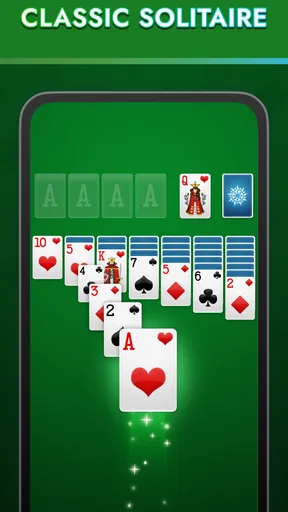
Right from the get-go, Solitaire: Classic Card Games gives off major retro vibes. The interface is clean and simple, which is perfect for anyone who just wants to jump in and start playing without any fuss. As soon as I opened the app, it felt like I was transported back to the good ol’ days when card games were all the rage on computers. It’s got that classic look with a modern twist, which I totally dig.
Gameplay Mechanics
The gameplay is exactly what you’d expect from a classic solitaire game. It’s the traditional Klondike setup, which is probably what most of us are used to. The cards are easy to read, and the touch response is super smooth. I didn’t experience any lag or glitches, which is a huge plus. Also, the drag-and-drop feature is spot on, so you don’t have to worry about cards slipping away from your fingers.
One thing I really appreciate is the option to play either Draw 1 or Draw 3. It’s these small touches that make the game feel personal, allowing you to choose your own level of challenge. Oh, and there’s an undo button which, trust me, you’ll be thankful for when you realize you’ve made a move that you instantly regret.
Features That Stand Out
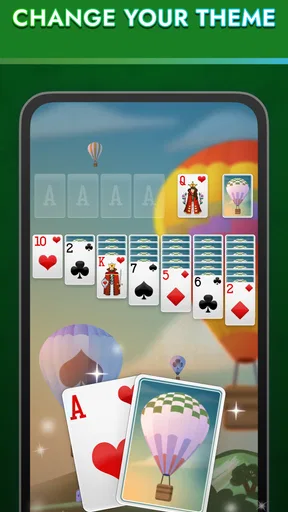
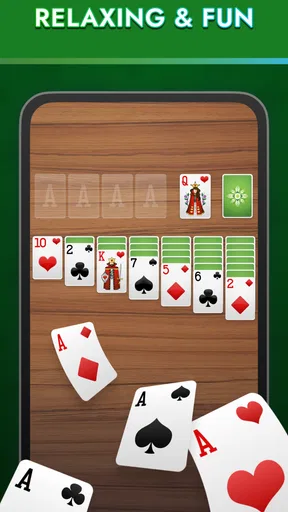
Okay, let's talk features. Solitaire: Classic Card Games isn’t just a pretty face. The app comes with customizable themes, so you can change up the card backs and backgrounds to keep things fresh. Personally, I’m a fan of the classic green felt, but there are plenty of options to suit your mood.
There’s also a stats tracker, which is great if you’re competitive like me. I love seeing my win percentage and trying to beat my personal best time. It’s a neat feature that adds a layer of motivation to keep playing.
Ads and In-App Purchases
Now, let’s talk about the stuff we all love to hate: ads. Yes, they’re there, but they’re not as intrusive as in some other free games. You might get an ad every few games, but it’s definitely bearable. If you’re really not into ads, there’s an option to remove them with a one-time purchase, which is nice.
As for in-app purchases, there are a few options for additional themes and features, but honestly, the free version of the app is more than sufficient for a casual player.
Why You Should Download It
If you’re looking for a no-frills, nostalgic card game experience, Solitaire: Classic Card Games is a fantastic choice. It’s perfect for quick breaks, long commutes, or just winding down after a busy day. The app delivers exactly what you’d expect from a classic solitaire game with a few extra bells and whistles to keep things interesting.
In a world where flashy graphics and complicated gameplay often overshadow simplicity, it's refreshing to play something that’s straightforward and engaging. So, whether you’re a solitaire newbie or a seasoned pro, give this app a whirl. You might just find yourself hooked all over again.
A long-running game in its current form
This is a mature card game rather than a brand-new take on solitaire. It was released on December 16, 2011, and the current version is 2.1.386.2. Those details give me useful context about its lifespan and present release, but they don’t tell me exactly which changes arrived in each update. I wouldn’t assume that a particular screen or feature is new just because it appears in the current version.
For someone who has played for years, the safest expectation is continuity in the core Klondike routine: the appeal remains a familiar deal, a few choices about how to play, and a personal record to revisit. The version number alone cannot show whether an update changed the interface or fixed a specific issue, so I’d judge the current experience by how it feels on my own device rather than infer a detailed update history.
What returning players should check
If you’re coming back after a break, I’d take a moment to confirm that the game still feels comfortable before chasing old records. Check that the card faces are readable, try both draw styles, and make a few deliberate moves to get used to the touch controls again. A short warm-up hand can reveal more than relying on a memory of how an older version felt.
The minimum operating system is 7.1. That makes compatibility worth checking before installing, especially on an older device; it doesn’t guarantee that every device meeting the minimum will feel equally responsive. If smooth card movement matters to you, test a brief session first. For a game built around dragging and tapping, comfort with the controls is as important as the rules themselves.
Small decisions that make a session better
I get more out of the stats tracker when I use it as a prompt, not a scoreboard. If my results dip, I can slow down and look for moves that reveal hidden cards instead of repeatedly playing for speed. Likewise, changing the theme can be more than decoration: choosing a table and card-back combination that makes the cards easy for me to distinguish is a practical choice for longer sessions.
There is a trade-off between using undo freely and building confidence in my own decisions. When I’m learning, undo helps me see how a different move changes the board. When I’m trying to improve, I sometimes leave a questionable move in place and work through the consequences. That makes the feature useful for both experimentation and practice, without turning every hand into a perfect-information puzzle.
What I’d watch for over time
For an established game, the things I care about most are whether the familiar controls remain dependable, whether the visual options continue to make cards comfortable to read, and whether the free experience still feels reasonable for my tolerance of ads. I’d also look at the purchase screen carefully before buying anything, since the available items and their prices are best judged at the moment I use the app.
My overall view is that this is a focused way to play Klondike, not a substitute for every kind of card entertainment. The rating and broad audience make it easy to understand why many people give it a try, but the deciding question is simpler: do I want a quiet, self-paced hand of solitaire on my phone? If yes, this remains an appealing option; if I want variety, competition, or more involved progression, I’d choose an app designed around those priorities.
Pros
- Simple
- intuitive interface
- Various difficulty levels
- Offline play available
- Daily challenges enhance fun
- Minimal ads
- non-intrusive
Cons
- Limited customization options
- No multiplayer mode
- Repetitive background music
- Occasional lag on older devices
- Few theme variations
FAQs for Solitaire: Classic Card Games
Is Solitaire: Classic Card Games free to play?
Yes, Solitaire: Classic Card Games is free to download and play. However, the app includes optional in-app purchases that can enhance the gaming experience, such as removing ads or unlocking special themes. Players can enjoy the full game without spending money, but these purchases can provide additional features.
Does Solitaire: Classic Card Games require an internet connection?
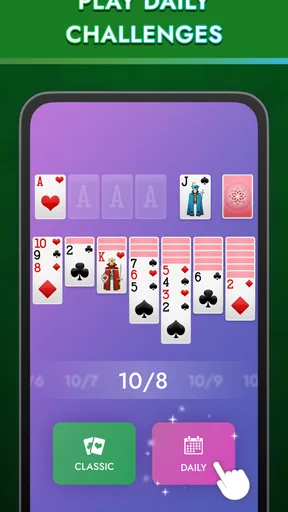
No, Solitaire: Classic Card Games does not require an internet connection to play. You can enjoy the game offline, making it perfect for commuting or when you're in areas with no internet access. However, some features, like leaderboards or daily challenges, may need an internet connection.
What are the main features of Solitaire: Classic Card Games?
Solitaire: Classic Card Games offers a variety of features, including different card themes, daily challenges, and multiple solitaire modes like Klondike and Spider. The app also provides customizable backgrounds, a hint system for guidance, and a scoring system to track progress. These features make the game engaging for both new and experienced players.
How user-friendly is the interface of Solitaire: Classic Card Games?
The interface of Solitaire: Classic Card Games is designed to be intuitive and user-friendly. With clear, easy-to-navigate menus and customizable settings, players can quickly start a game or adjust the difficulty level. The app also offers helpful tutorials for beginners, ensuring a smooth gaming experience for all users.
Are there any ads in Solitaire: Classic Card Games?
Yes, Solitaire: Classic Card Games includes advertisements, which help keep the app free for users. Ads typically appear between games or in the menu. Players can choose to make a one-time purchase to remove ads if they prefer an uninterrupted gaming experience. This option supports the developers and enhances the gameplay.


